
Note: Some statuses are brief transitions and rarely display as the current step. They are marked "Moves forward automatically" below.
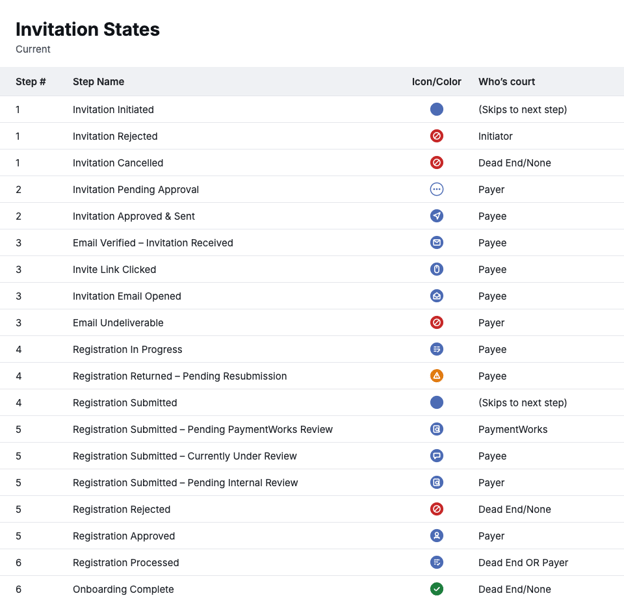
Step 1: Invitation Initiated
| Status | What it means | Who acts next |
|---|---|---|
| Invitation Initiated | The invite was created. | Moves forward automatically |
| Invitation Rejected | An approver returned the invite to the initiator. The reason displays in Approval History. | Initiator. Resend the invite with updates, or withdraw it. |
| Invitation Cancelled | The invite was withdrawn. It cannot be restored. | No further action. Send a new invite if needed. |
| Status | What it means | Who acts next |
|---|---|---|
| Invitation Pending Approval | The invite is waiting for one or more approvers before it is sent. | Your team's invite approvers |
| Invitation Approved & Sent | The invite was approved and emailed to the payee. | Payee |
| Status | What it means | Who acts next |
|---|---|---|
| Invitation Email Opened | The payee opened the invite email but has not registered. | Payee |
| Invite Link Clicked | The payee clicked the registration link but has not finished creating an account. | Payee |
| Email Undeliverable | The invite email could not be delivered. | Your team. Confirm the email address and resend the invite. |
| Email Verified – Invitation Received | The payee created a PaymentWorks account and is linked to this onboarding. | Payee |
| Status | What it means | Who acts next |
|---|---|---|
| Registration In Progress | The payee started their profile but has not submitted it. | Payee |
| Registration Returned – Pending Resubmission | Your team returned the submission for corrections. The tracker turns gold. | Payee |
| Registration Submitted | The payee submitted their profile. | Moves forward automatically |
| Status | What it means | Who acts next |
|---|---|---|
| Registration Submitted – Pending PaymentWorks Review | PaymentWorks is reviewing the submission, typically to verify bank details. | PaymentWorks |
| Registration Submitted – Currently Under Review | The submission is under review and waiting on a response from the payee. | Payee |
| Registration Submitted – Pending Internal Review | The submission is waiting for your team's approvers in Profile Manager. | Your team |
| Registration Approved | All required approvers approved the submission. | Your team. Process or connect the profile in Profile Manager. |
| Registration Rejected | The submission was rejected by your team or by PaymentWorks. The tracker turns red. | No further action |
| Status | What it means | Who acts next |
|---|---|---|
| Registration Processed | The approved submission was marked as processed but is not yet connected. | Your team, if connection is still needed |
| Onboarding Complete | The payee is connected and a Vendor Number is assigned. The tracker turns green. | No further action |
Tip: Records waiting on an action show how long they have been in their current status in the Last Update column. Use this to spot onboardings that may need a follow-up.
Open Details from the Current Step
Click the Current Step link on any record to jump to the most useful details.
| Current step | Where the link goes |
|---|---|
| Steps 1 and 2, and Invitation Email Opened | The Invitation Detail tab |
| Email Verified – Invitation Received | The Account Info tab |
| Steps 4 through 6 | The payee's profile in Profile Manager |
Note: Registration In Progress displays as plain text. The payee hasn't submitted yet, so there is nothing to open in Profile Manager.