
How Data Changes Are Organized
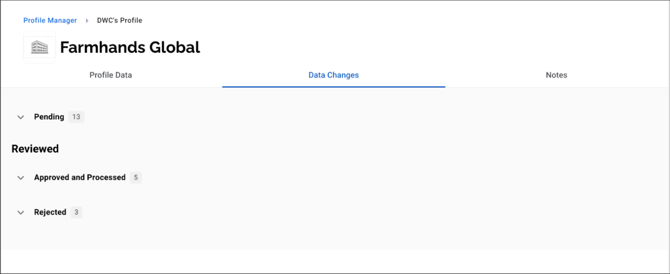
Change Groups:
Data changes are grouped by status for easier review and workflow tracking:
- Pending: Changes awaiting review action
- Reviewed: Approved or rejected, not yet processed
- Approved, Processed, and Connected:
- Approved: Passed all required approvals
- Processed: Status has been set to Processed
- Connected: Fully approved and connected (Location changes only)
- Rejected: Declined and closed; no further action
- Approved, Processed, and Connected:
Types of Data Changes
-
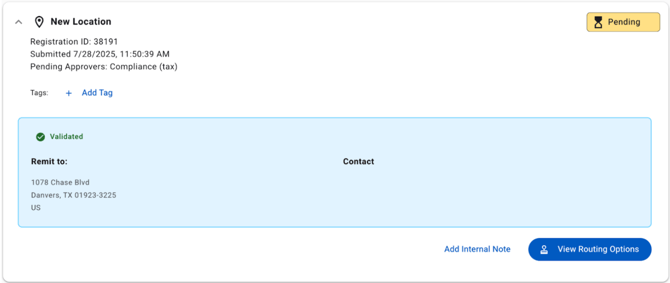
New Location – A newly shared remittance address (location) from the profile owner
-
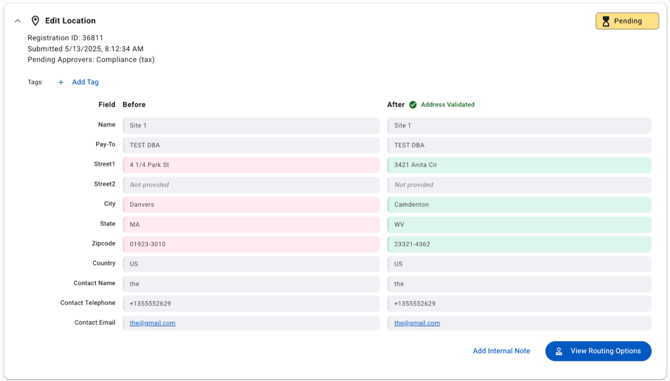
Edit Location – Updates made to an existing connected address (location)
-
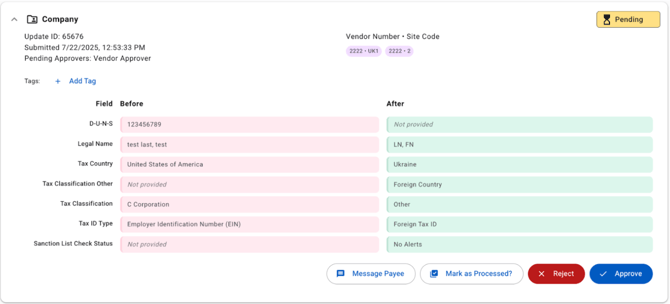
Other Data Changes – Includes updates to:
-
Bank Details
-
Company Information
-
Sanctions Alerts
-
Additional Fields
- Any other payee-submitted information
-
For most changes, before-and-after values are displayed to help reviewers evaluate updates clearly.
Each data change has an associated Change ID (also referred to as an Update ID or Registration/Request ID), which can be used to reference or track a specific change.
Available Actions
Depending on the change type and your role, you may be able to:
-
Approve
-
Reject
-
Route and Approve
-
Mark as Processed (for non-location updates)
-
Send Message (for non-location updates)
-
Add or Remove Tags
-
Add Internal Notes (available for New and Edit Location changes)
- Connect Address (available for approved New Location changes)
Note: The Connect Address action connects a fully approved New Location, establishing it as a connected location on the profile. Once connected, any linked bank account will arrive as a separate generated data change for review. Once a location is fully approved, it will also appear under the Locations & Banking tab, where it can also be fully connected.
Processing New and Edit Location Data Changes
Once a New Location or Edit Location data change has been fully approved, users with the ability to Approve/Reject the data change can manually set it to Processed one at a time directly from the Data Changes tab.
Note: The Mark All Approved Requests as Processed action (available from the Profiles List) requires a separate explicit permission that is not automatically granted. Users who do not have this permission can still process approved New Location and Edit Location data changes individually from this tab.