
Key Components
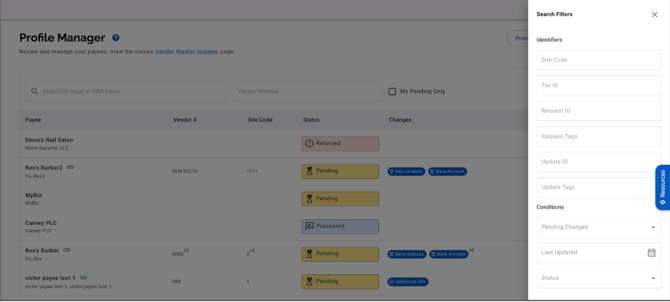
1. Search and Filters
Use the top toolbar to narrow down profiles:
-
Search by Legal Name or DBA Name
-
Quick Filters:
-
Vendor Number
-
My Pending Only
-
-
More Filters:
-
Status
-
IDs
-
Tags
-
Data Change Types
-
Dates
-
2. Profiles Table
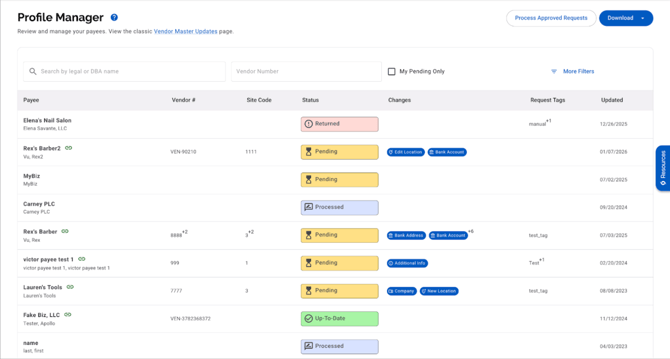
Each row in the table represents one profile and includes:
| Column | Description |
|---|---|
| Profile Name | Display name with legal name underneath |
| Connection Indicator | Shows if the profile is connected to your system |
| Vendor Number | External ID (connected profiles only) |
| Site Code | Optional external site reference |
| Status | Overall profile status |
| Changes | Types of pending data changes |
| Request Tags | Internal tags for collaboration |
| Updated | Most recent activity date |
Note: Profiles can be in various states (e.g., pending review, connected), but all are managed from this unified list.
Actions
-
Process Approved Requests
Marks all approved submissions and eligible location requests as Processed. -
Downloads (Legacy)
These exports mirror the legacy Classic New Requests page:-
Requests: Export all request records (full, partial, edits)
-
Updates: Export all update records (bank, address, sanctions, etc.)
-