
Key Components
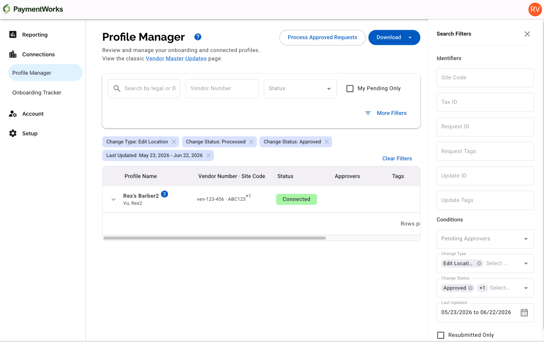
1. Search and Filters
Use the top search and filter bar to narrow down profiles:
- Search by Legal Name or DBA Name
- Primary Filters:
- Status
- Vendor Number
- My Pending Only
- More Filters:
- IDs
- Tags
- Pending Approvers (Roles)
- Change Type
- Change Status
- Resubmitted Only (profiles that were returned at least once and resubmitted)
- Dates
Notes about Change Type, Change Status, and Pending Approvers filters:
Change Type and Change Status are two separate filters that work together. Change Type filters by the type of data change (e.g., New Location, Bank Details), while Change Status filters by the current status of a data change (e.g., Pending, Approved, Processed). They can be used independently or combined.
The Pending Approvers filter returns profiles that have at least one pending change on an approval step assigned to the selected role across both onboarding submissions and data changes. Profiles with pending changes that have no explicit role assigned will not surface under any Pending Approver filter value.
Active Filters are displayed below the filter pane once applied. Up to five active filters are shown by default, with the option to expand and view all.
2. Profiles Table
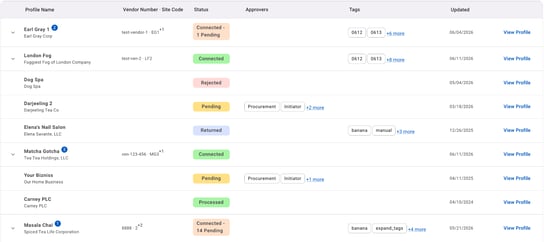
Each row in the table represents one profile and includes:
|
Column |
Description |
|
Profile Name |
Display name with legal name underneath. Profiles resubmitted after a return display a resubmission indicator and count. Profiles that have been returned to the payee display a returned counter showing the number of times the profile has been returned to the payee and resubmitted. |
|
Vendor Number · Site Code |
Combined column displaying the external Vendor Number and Site Code (connected profiles only). |
|
Status |
Overall profile status (see Status Definitions below) |
|
Approvers |
Pending approver roles for unconnected profiles awaiting onboarding submission approval. Pending approvers for data changes are shown in the Expanded Profile Row under Pending Changes. |
|
(Request) Tags |
Tags associated with the onboarding submission. Tags associated with pending data changes are shown in the Expanded Profile Row under Pending Changes. |
|
Updated |
Most recent activity date, reflecting the latest between the profile submission date and any data change submission date. |
Note: Profiles can be in various states (e.g., pending review, connected), but all are managed from this unified list.
3. Expanded Profile Row
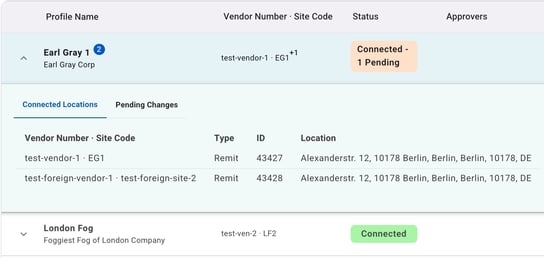
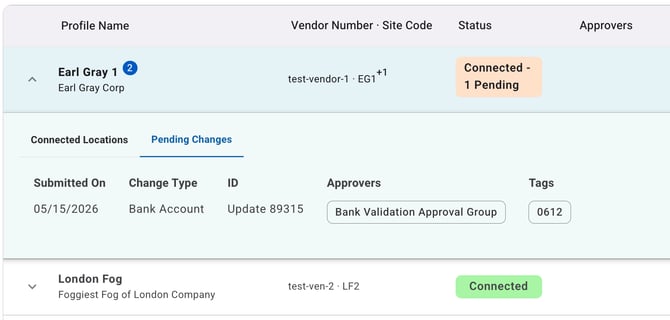
Connected profiles can be expanded to reveal additional details directly from the list. Click on the caret/expander located on the left side of the connected profile row to expand it and view:
- Connected Locations: includes Vendor Number, Site Code, Address Type, (Request) ID, and Full Address / Location for each connected location
- Pending Changes: a summary of any outstanding data changes, including their type, pending approver role(s), and tags
Status Definitions
Connected profile statuses:
|
Status |
Description |
|
Connected |
Profile is connected with no pending data changes. |
|
Connected - Pending |
Profile is connected and has one or more pending data changes. The number of pending changes is displayed on the status chip. e.g., Connected - 7 Pending. |
Unconnected profile statuses:
|
Status |
Description |
|
Pending |
Onboarding submission has been submitted and is awaiting review. |
|
Approved |
Submission has been approved but not yet connected. |
|
Processed |
Manually set by the payer user. The profile is in a post-approval state of “Processed,” which may stage the profile to be connected. |
|
Rejected |
Submission was declined. |
|
Returned |
Submission was returned to the payee for correction or for clarification. |
Actions
- Process Approved Requests Marks all approved submissions and eligible location requests as Processed.
Note: This action requires the Mark All Approved Requests as Processed permission. This permission is not automatically granted and must be explicitly added to a user's role. - Downloads (Legacy) These exports mirror the legacy Classic New Requests page:
- Requests: Export all request records (full, partial, edits)
- Updates: Export all update records (bank, address, sanctions, etc.)
Note: Consolidated profile exports / downloads are not currently available. Profile records are still maintained as both requests / updates, and updated profile-focused export capabilities will be available in the future.