
Access Instructions
- Log in to the Payments platform.
- Click Payments.
- From the dropdown, select Withheld Payments.
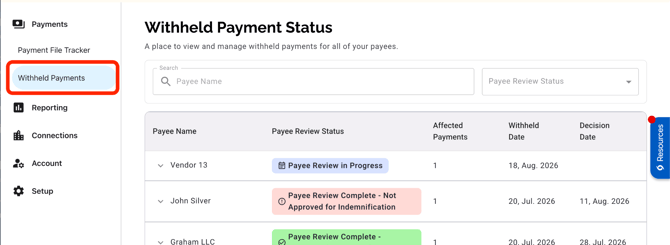
The Withheld Payment Status page displays the following details:
- Payee Name
- The name of the payee that has a withheld payment.
- Payee Review Statuses and Definitions
- Payee Review Pending: This payee is awaiting review by a PaymentWorks Fraud Operations analyst.
- Payee Review in Progress: A PaymentWorks Fraud Operations analyst is actively reviewing the payee associated with the payment.
- Payee Review Complete - Approved for Indemnification: PaymentWorks has completed its review and payee verification was successful. Future payments will be approved and indemnified.
- Payee Review Complete - Not Approved for Indemnification: PaymentWorks has completed its review and was not able to verify the payee.
- Affected Payments
- The total number of withheld payments associated with this payee.
- Withheld Date
- The date the payment was withheld.
- Decision Date
- The date PaymentWorks’ Fraud Operations team completed the review.
Viewing Payment Details
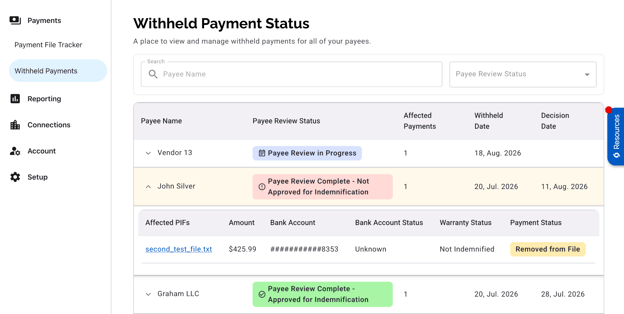
- Click a Payee Name to expand the entry and view its affected payments.
- Click an Affected PIF to view its details on the Payment Details page.
Searching and Filtering
- Use the Search field to find a specific payee by name.
- Use the Payee Review Status filter to narrow the list by status.
Important Notes
- When a Payee Review Status is Payee Review Complete - Approved for Indemnification, the original payment is not automatically released. If PaymentWorks is able to successfully verify the bank information before the payment file has been sent to the bank, the payment will be updated to Approved for Indemnification. If the payment was already removed from the file before it was sent to the bank, the payer will need to resubmit the payment in a future file.
- Payee Review Complete – Not Approved for Indemnification notifications are sent twice daily at 11:00 a.m. ET and 6:00 p.m. ET. You will receive one email per payee that consolidates all withheld payments associated with that payee. For the most current information, view the payee review statuses on the Withheld Payment Status page.